Available Devices
We support several teleoperation devices in simulation, but for the best control experience we recommend using the SO101 Leader.
Single-Arm SO101 Follower
You can control the Single-Arm SO101 Follower in simulation with SO101 Leader or keyboard.
SO101-Leader
Run with --teleop_device=so101leader to enable the SO101 Leader; once the port is configured you can start operating immediately.
When you move the physical SO101 Leader, the simulated manipulator mirrors the same motion.
Keyboard
Run with --teleop_device=keyboard to enable keyboard control.
| target frame | translation control | rotation control |
|---|---|---|
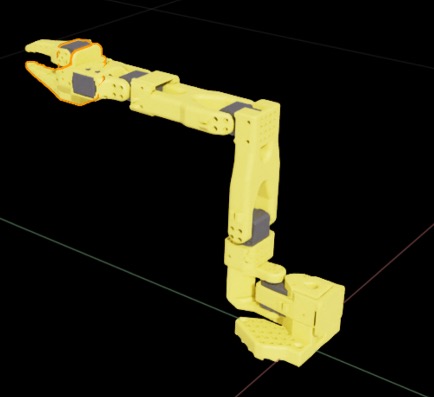 | 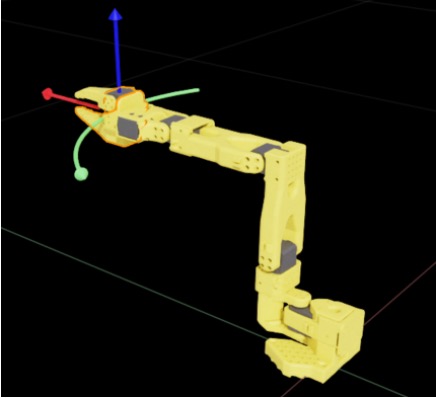 | 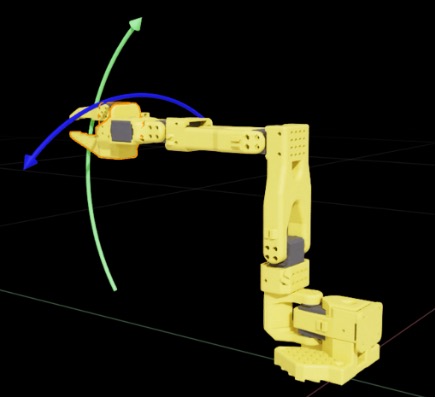 |
Keyboard teleoperation relies on target-frame-based control. Within the target-frame (gripper link) coordinate system, key signals always command the movement of that frame, so the operator only needs to focus on the desired pose of the link rather than sending joint-level commands. Gripper joints are still handled separately.
We split target-frame control into translation and rotation. Translation covers forward/backward, up/down, and left/right motions of the target frame. Because of the manipulator structure, the left/right action is effectively a rotation around the base rather than a pure translation. Rotation control includes pitch up/down and rotation around the wrist link.
The keyboard mapping is as follows:
| input key | description |
|---|---|
W / S | Forward/backward, aligned with the red arrows in the translation diagram |
A / D | Left/right, aligned with the green arrows in the translation diagram |
Q / E | Up/down, aligned with the blue arrows in the translation diagram |
J / L | Rotate (yaw) left/right, aligned with the blue arrows in the rotation diagram |
K / I | Rotate (pitch) up/down, aligned with the green arrows in the rotation diagram |
U / O | Gripper open/close |
Gamepad
Run with --teleop_device=gamepad to enable gamepad control. (Now we support xbox series controller.)
Similar to the keyboard controls, the gamepad also commands the target frame (gripper link) and is divided into translation control and rotation control. The mappings are described below.
| control key | description |
|---|---|
move L forward / move L backward | Forward/backward, aligned with the red arrows in the translation diagram |
move L left / move L right | Left/right, aligned with the green arrows in the translation diagram |
move R forward / move R backward | Up/down, aligned with the blue arrows in the translation diagram |
move R left / move R right | Rotate (yaw) left/right, aligned with the blue arrows in the rotation diagram |
press LB / press LT | Rotate (pitch) up/down, aligned with the green arrows in the rotation diagram |
press RT / press RB | Gripper open/close |
Bi-Arm SO101 Follower
Because keyboard control becomes complicated for dual arms, the Bi-Arm SO101 Follower in simulation currently supports only the Bi-SO101 Leader.
Bi-SO101-Leader
Run with --teleop_device=bi-so101leader to enable the Bi-SO101 Leader. After configuring both left_arm_port and right_arm_port, you can operate immediately, and the two simulated arms will reproduce the real bi-arm behavior.
LeKiwi
LeKiwi的teleoperation可以分为两个部分,分别是单臂SO101 Follower的控制,以及底座的控制。
lekiwi-leader
Run with --teleop_device=lekiwi-leader to enable it. In this configuration, the SO101 Follower is controlled by the SO101-Leader arm, while the mobile base is driven via the keyboard.
The default keyboard mappings are:
| input key | description |
|---|---|
| ⬆️ / ⬇️ | Move forward / backward |
| ⬅️ / ➡️ | Move left / right |
Z / X | Rotate left / right |
1 / 2 / 3 | Set speed level to slow / medium / fast |
lekiwi-keyboard
Run with --teleop_device=lekiwi-keyboard to enable it. In this configuration, both the SO101 Follower and the mobile base are controlled via the keyboard.
The arm uses the same key mappings as the Keyboard configuration described above, and the base shares the same keyboard controls as in the lekiwi-leader configuration.
lekiwi-gamepad
Run with --teleop_device=lekiwi-gamepad to enable it. In this configuration, both the SO101 Follower and the mobile base are controlled via the gamepad.
The arm uses the same mappings as the Gamepad configuration described above, while the mobile base uses the following layout:
| control key | description |
|---|---|
| D-pad ⬆️ / D-pad ⬇️ | Move forward / backward |
| D-pad ⬅️ / D-pad ➡️ | Move left / right |
X / B | Rotate left / right |
Y / A | Increase / decrease speed level (slow / medium / fast) |